I. The Problem with Static API Documentation
Your team has done the hard work. The API endpoints for the next big feature have been designed and agreed upon. But where does this crucial design live? All too often, it's trapped in a Google Doc or a PDF.
While this is better than no documentation, it creates its own set of frustrations:
- Manual Mocking: For the frontend team to make any progress, they have to manually create and maintain mock data files (
users.json,products.json, etc.). This is time-consuming, error-prone, and has to be constantly updated if the API design changes. - Documentation Rot: Static docs are difficult to keep in sync with the actual implementation. Once the code is written, the document is often forgotten, quickly becoming outdated and unreliable.
The core issue is that your API design is a passive reference instead of an actionable tool. What if we could transform that static design into a living, interactive contract that generates documentation and mock servers for us? With OpenAPI (Swagger) and Prism, we can.
II. From Static Docs to a Living Contract
The solution is to formalize your existing design into a machine-readable contract. This contract defines every aspect of the API: its endpoints, the data it expects, the data it returns, and potential error codes.
The industry standard for this is the OpenAPI Specification. By translating your Google Doc design into an OpenAPI document (a YAML/JSON file), you create a single source of truth that is both human-readable and machine-readable.
The key benefits of this approach are immense:
- A Single Source of Truth: No more confusion or outdated wiki pages. The OpenAPI file is the definitive, unambiguous guide to the API's structure.
- Automated Mocking: The contract can be used to automatically generate a fully functional mock server, freeing your frontend team from manual data creation.
- Interactive Documentation: The contract generates beautiful, interactive documentation that is always up-to-date.
III. Formalizing the Contract with Swagger/OpenAPI
Let's take that design from your document and formalize it. You can use tools like the online Swagger Editor to make this process easier with auto-completion and real-time validation.
Here's how we'd translate a simple user API design into a specification:
api-spec.yaml
openapi: 3.0.0
info:
  title: Simple User API
  description: A basic API to manage users for our application.
  version: 1.0.0

servers:
  - url: http://localhost:4010
    description: Local mock server for frontend development

paths:
  /users:
    get:
      summary: Get all users
      description: Retrieves a list of all users.
      responses:
        '200':
          description: A successful response with a list of users.
          content:
            application/json:
              schema:
                type: array
                items:
                  $ref: '#/components/schemas/User'
  /users/{userId}:
    get:
      summary: Get a single user by ID
      description: Retrieves a single user by their unique ID.
      parameters:
        - name: userId
          in: path
          required: true
          schema:
            type: integer
      responses:
        '200':
          description: A successful response with a single user object.
          content:
            application/json:
              schema:
                $ref: '#/components/schemas/User'
        '404':
          description: User not found.

components:
  schemas:
    User:
      type: object
      properties:
        id:
          type: integer
          example: 1
        name:
          type: string
          example: 'Roger Twan'
        email:
          type: string
          format: email
          example: 'roger.twan@gmail.com'
This file clearly and unambiguously defines:
- The available paths (
/usersand/users/{userId}). - The expected responses and status codes (
200 OK,404 Not Found). - A reusable data model (
User) with explicit types, ensuring consistency.
Generating Interactive Documentation
One of the most immediate wins is auto-generated documentation. A tool like Swagger UI can parse this YAML/JSON file and produce a beautiful, interactive web page where developers can explore and even test the API endpoints directly in their browser. This is far superior to a static PDF.
IV. Solving the Mocking Problem with Prism
With our contract formalized, we can now solve the frontend team's second major headache: manually creating and maintaining mock data. A mock server will ingest our OpenAPI specification and return realistic example data that conforms to it.
Our tool of choice is Prism. It's an open-source, lightweight mock server from Stoplight that requires zero configuration. Its key features are:
- Dynamic Response Generation: Prism automatically generates mock data based on schemas. No more
users.jsonfiles! - Request Validation: It can validate incoming requests against your spec, helping frontend developers catch errors early.
Setup and Usage
Getting Prism running is incredibly simple. First, install it via npm:
npm install -g @stoplight/prism-cli
Next, point Prism at your OpenAPI contract file to start the mock server:
prism mock api-spec.yaml
That's it! You now have a fully functional mock API server running locally, typically on port 4010, serving dynamic data that perfectly matches the agreed-upon design.
Testing the Mock Server
Let's send a request to our mock server using curl:
# Request the list of all users
curl http://localhost:4010/users
Prism will see the request, look at your api-spec.yaml, and generate a valid response:
[
  {
    "id": 1,
    "name": "Roger Twan",
    "email": "roger.twan@gmail.com"
  }
]
The frontend team can now point their development environment to http://localhost:4010 and start building immediately with zero mocking effort.
V. Taking It to the Cloud
Running these tools locally is great for individual developers, but the real power of a shared contract comes from making it easily accessible to everyone. By deploying both our interactive documentation and our mock server to the cloud, we create a centralized hub for our API.
Why deploy them?
- Centralized Access: Product managers, QA testers, and other teams can view the documentation without any technical setup.
- Stable Endpoint for Testing: Mobile developers or automated CI/CD pipelines can be configured to hit a stable mock server URL (e.g.,
https://mock.api.yourcompany.com). - Single Source of Truth: Everyone in the company looks at the same version of the documentation and interacts with the same mock server behavior.
Deploying these services is straightforward using Docker and any modern cloud provider (like AWS, GCP, or Azure).
1. Deploying Swagger UI (The Docs)
We can use the official Swagger UI Docker image to serve our documentation. First, create a Dockerfile in the same directory as your api-spec.yaml:
Dockerfile.docs
FROM swaggerapi/swagger-ui:v5.17.14

# Copy our API specification into the container's html directory
# Swagger UI will automatically find and display it.
COPY api-spec.yaml /usr/share/nginx/html/api-spec.yaml

# Expose the default Nginx port
EXPOSE 8080

# Set an environment variable to point Swagger UI to our spec file
ENV URLS="[ { url: \"api-spec.yaml\", name: \"User API\" } ]"
You can build and run this container, and then deploy it to your cloud provider. Once deployed, you can point a domain like docs.api.yourcompany.com to it.
2. Deploying Prism (The Mock Server)
Similarly, we can create a Docker container for our Prism mock server.
Dockerfile.mock
FROM stoplight/prism:4.1.0

COPY api-spec.yaml /usr/src/app/api-spec.yaml

# Expose the port Prism runs on
EXPOSE 4010

# The command to run when the container starts
# It tells Prism to mock the spec file on all network interfaces
CMD ["mock", "-h", "0.0.0.0", "/usr/src/app/api-spec.yaml"]
Deploy this container to your cloud provider and point a different domain, like mock.api.yourcompany.com, to it.
3. Updating the API Specification
Finally, let's update our api-spec.yaml to include our new, shared mock server URL. This allows developers to easily switch between local and shared environments.
api-spec.yaml (updated servers block)
servers:
  - url: https://mock.api.yourcompany.com
    description: Shared mock server (Cloud)
  - url: http://localhost:4010
    description: Local mock server for frontend development
Now, your interactive documentation will even feature a dropdown menu, allowing users to target either the shared cloud mock server or their local one.
VI. Workflow Comparison
Let's contrast the old workflow with our new, improved one.
Old Way (With Static Docs):
- The API design is finalized in a Google Doc.
- The frontend team reads the doc and spends hours creating manual mock files.
- The backend team interprets the doc and starts building the real API.
- When the frontend and backend are integrated, they discover their interpretations (and the frontend's mocks) didn't match the final implementation. Cue the bug fixes.
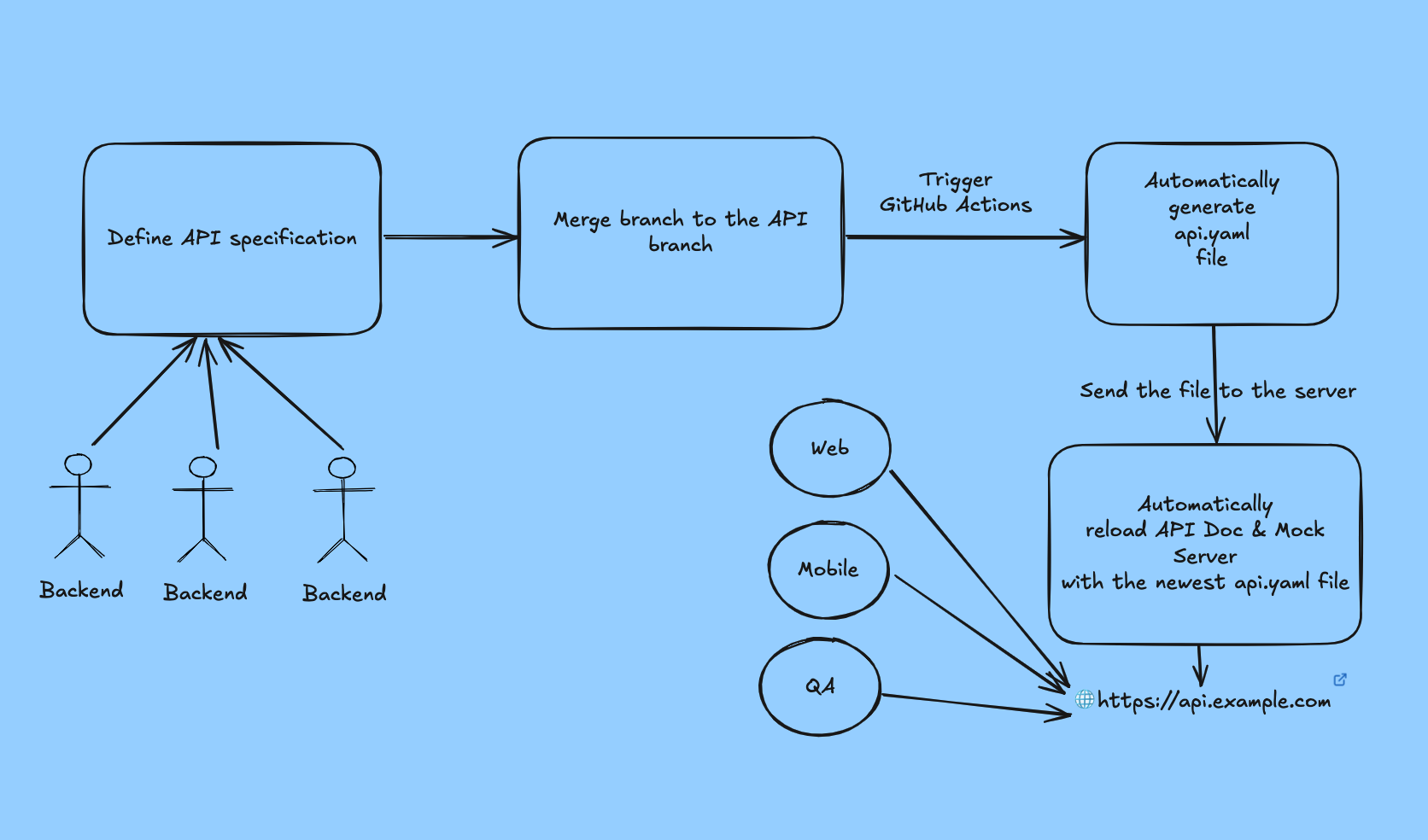
New Way (With a Deployed API Contract):
- Formalize the Design: The agreed-upon design is formalized into a single
api-spec.yamlfile and pushed to a repository. - Automated Deployment: A CI/CD pipeline automatically deploys the interactive docs to
docs.api.yourcompany.comand the mock server tomock.api.yourcompany.com. - Work in Parallel:
- Backend Team: Implements the real API logic, using the spec as their guide.
- Frontend Team: Immediately starts building UI components against the stable, shared mock server URL. No local setup is needed.
- QA Team: Starts writing automated tests against the shared mock server.
- Integrate with Confidence: When the real backend is ready, the frontend team just has to switch the base URL. The integration is seamless because both teams built against the exact same contract.
VII. Conclusion
By moving your API designs from static documents to a formal OpenAPI contract, you transform your documentation from a passive reference into an active development tool. Deploying these tools to a shared environment amplifies their benefits, creating a central, reliable hub for collaboration.
This simple shift brings clarity, eliminates ambiguity, and automates the tedious work of creating and maintaining mock data. You'll spend less time deciphering outdated documents, less time fixing integration bugs, and more time building great features. If your team is struggling with the limitations of static docs, it's time to adopt a modern, contract-driven workflow.